Pieces, recording, and the table
A note is more than one line: hold the + to record, write a piece, then join, split, and reorder — all reversible.
A fleeting note is built from pieces — a typed passage is one piece, and so is a stretch of speech recorded by holding the “+”. With a single piece it is no different from the one-liner you always jotted; with several, you can join them into one, split them back apart, reorder them — joining, splitting, and reordering are all reversible; not one word is lost.
Hold the “+” to record a piece
Press the “+” (center of the bottom bar on a phone, lower right on desktop) and keep holding — that is recording:
- Release to keep: let go after 1.5 seconds and the piece is kept; let go earlier and it is as if nothing happened.
- Swipe up to cancel: while holding, slide the finger up a little and release — the piece is not kept.
- One piece is 5 minutes at most: at the limit it stops and keeps itself.
- The overlay always carries two buttons, “Keep / Cancel” — you can close things out even when your finger is not on it (say, right after the microphone prompt).
- The keyboard path is the same long-press: Tab to the “+”, hold Space or Enter (keydown starts it, keyup ends it, key repeats are ignored), release to keep, Esc to cancel.
- The first time, the browser asks for microphone permission; once you allow it, it says “press and hold again to record” — the permission question does not count as a recording.
The recording is the point; text is the patch. While recording, speech is turned into a draft as best it can; failing to transcribe costs the recording nothing — the audio is all there. After release it waits up to ten seconds: words that arrive become the draft; none, and the piece is marked “Transcript pending”, waiting for you to add a few yourself.
Where recordings live, who hears them, for how long
- Only you can listen. Recordings sit in private storage only you can reach, and playback goes through temporary links good for a few minutes; both the database and the storage admit you alone — no interface anywhere can serve you someone else’s recording.
- Retention is 30 days, counted from the moment of recording; saving an edit of its text, or the note being shaped, pushes the deadline to “30 days after that”. Past it the audio is cleared — the text and the duration stay, and the player says “Recording past retention”.
- Quota: per person, currently kept recordings total at most 1 hour and at most 12 pieces (5 minutes each at most). Over the line it says so plainly — “Voice quota is used up”, “Recording limit reached — delete one to record again” — never a vague “couldn’t save”.
The piece table: inside a note
Tap any fleeting note in the inbox and you are at its piece table: pieces stacked vertically, one block per row.
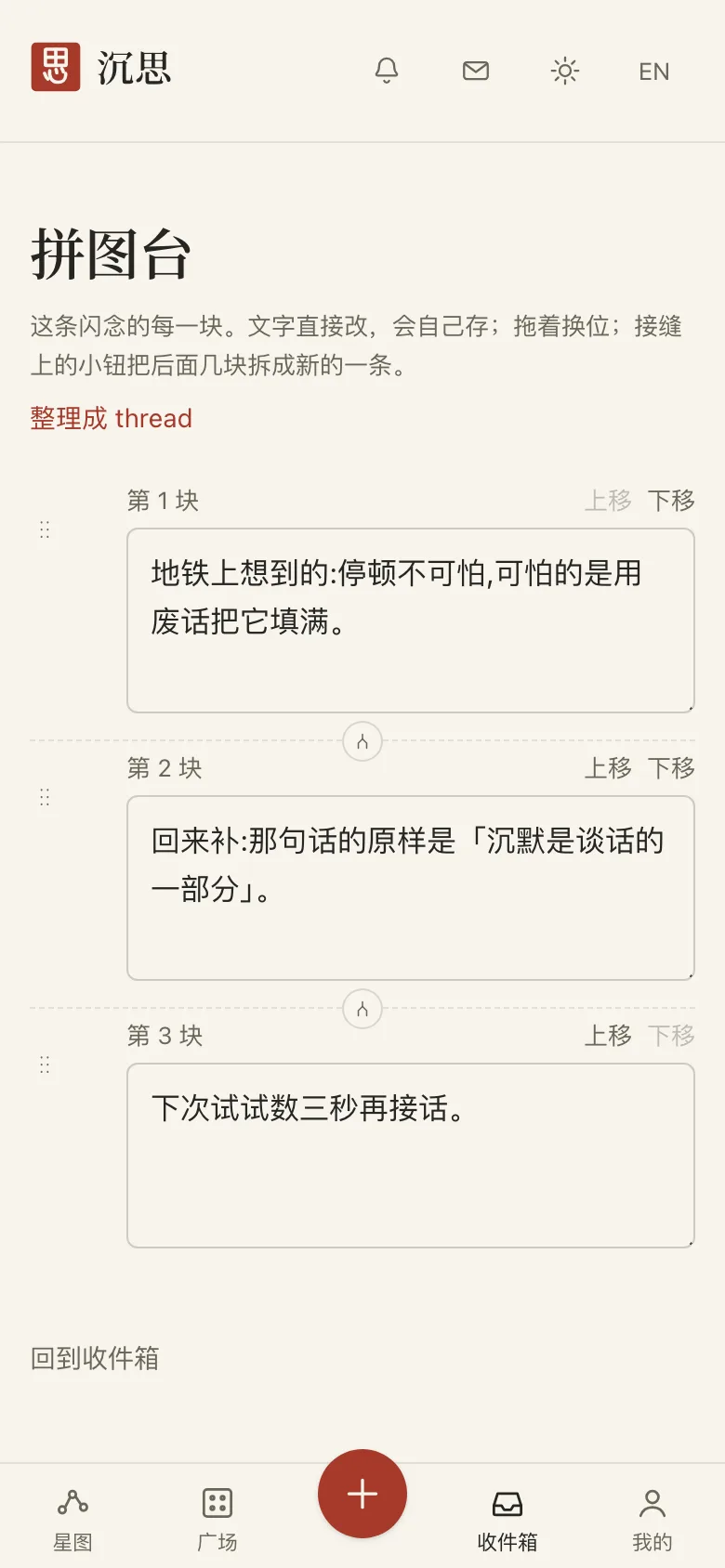
- Text blocks are editable in place and save themselves — about 0.6 seconds after you stop, or when focus leaves; closing the page or backgrounding it flushes any unsaved words to the database on the spot.
- A recording block is a player (1.5× available) plus a draft box; the “Transcript pending” mark disappears the moment you write a draft.
- Between blocks is a seam: its “Split” button cuts everything below the seam off into a new note.
- The handle on a block’s left drags it to reorder; the keyboard equivalent is each block’s Move up / Move down buttons.
- If the note carries a quote, the quote block is pinned to the top of the table — where you edit it, you can see which line it was written against.
Join and split: in the inbox
- Drag one note onto the lower half of another and release: the two join (lower half = appended after it). On a phone the handle at the row’s right edge is the main path — press and the drag starts; tap it instead and you enter “Join onto…” multi-pick, joining in the order you picked, first picked in front.
- Splitting is the reverse of joining (the “Split” on a seam), and reordering can be redone at any time.
- Two notes that both carry quotes cannot be joined — one note carries at most one quote, and the interface says so rather than silently dropping either.
Shaping: tick blocks one by one
The shaping page lists the note block by block, a checkbox in front of each: blocks with text are ticked by default; a pure recording with no draft yet is not — it has no words for the body. Ticked blocks compose the new thread’s body in order, a blank line between them; a live character count sits alongside, and past 5000 characters publishing is held while the blocks that pushed it over are marked.
Related pages
- Quick capture One line is worth keeping. It lands in an inbox only you can see.
- Inbox Notes you have not shaped yet, plus the threads you kept to think on. Only you can see it.
- Shaping a thread Give a note a real place — or turn it into a mood instead.
- Voice dictation Speak into text on the capture page. Dictation audio never leaves your device; hold the + to record instead.